Developed SnapStream, an offline data-transfer protocol using QR codes.
Designed to transfer large data payloads in environments without reliable connectivity.
Implemented a sequence of rapidly changing QR codes to send data chunks.
Created a proof of concept in C# and a final version in Flutter/Dart.
Successfully commercialised and adopted by major clients for field data transfer.
Project Overview
When I started at Blueberry Consultants, a client had a unique challenge: they needed to transfer large amounts of data between two tablets in a remote environment where methods like Wi-Fi or Bluetooth were unreliable or unavailable. This was a crucial requirement for their application, and my very first task was to find a solution.
Solution Design
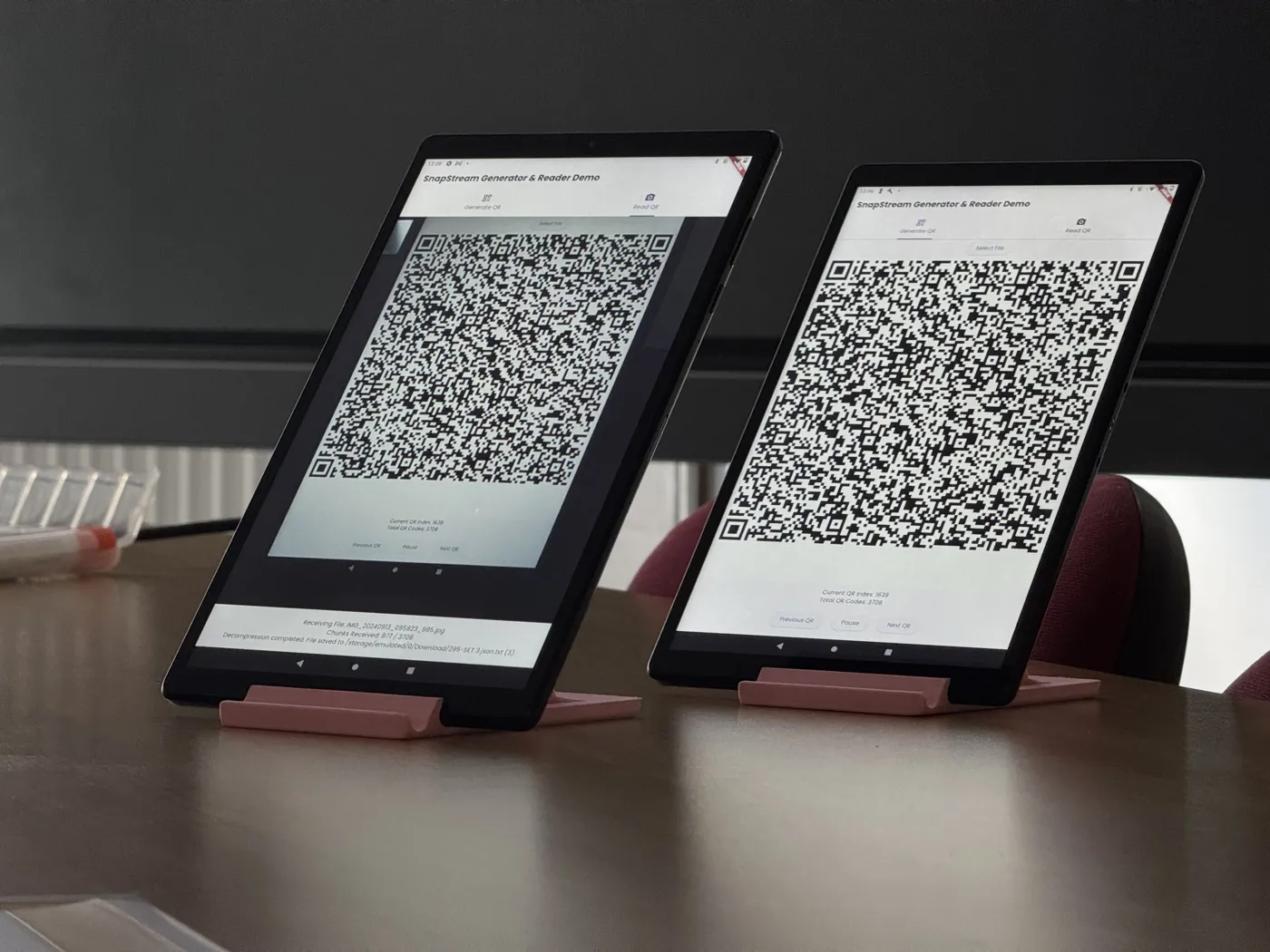
One common method of data transfer is the humble QR code, but thanks to the low density of data a QR code can store, it isn’t a viable solution for large transfers. Instead, I designed a protocol that uses a sequence of rapidly changing QR codes to transfer data in chunks. The idea is to take the data, compress it as much as possible, and encode each chunk into a specially formatted QR code. The sending device displays these codes in a high-speed sequence, while the receiving device uses its camera to read the stream, reconstruct the data, and verify its integrity using checksums.
Implementation
The first step was to create a proof of concept in C#. This was primarily to get me up to speed with the C# language, as it’s used heavily at Blueberry and I’d never used it before. The proof of concept was a simple Windows Forms application that could generate QR codes from a text input, display them in a sequence, and read them back using the camera.
Details of the protocol
The protocol works by first compressing the data using a lossless compression algorithm, then converting it into Base64. Each chunk of data is assembled into a QR code which crucially includes:
Protocol Name and Version: a simple string SnapStream/1.0 to identify the protocol and its version.
Chunk Index: an integer representing the index of the chunk in the sequence, starting from 0.
Total Chunks: an integer representing the total number of chunks in the sequence.
Checksum: a checksum of the data chunk to verify its integrity.
Data: the Base64-encoded data chunk itself.
This might seem like a lot of overhead, but it is necessary to properly reconstruct the data on the receiving end and, crucially, allows data to be sent in any order. This was important, as the devices used by the client were extremely slow and could not keep up with the QR sequencing without dropping frames, resulting in broken reconstruction. That is why I designed the protocol to be resilient to this, allowing the receiving device to reconstruct the data even if some chunks are received out of order or dropped.
Final Implementation
The final production version was a package built using Flutter / Dart for cross-platform deployment on mobile devices. This was chosen as it allowed a single codebase for both Android and iOS, and the framework provided a rich set of libraries for QR generation and camera access. It also allowed for easy integration with any of the existing mobile apps we had created for clients at Blueberry Consultants.
Outcome
The SnapStream protocol was extremely well received and has been successfully commercialised. With praise on LinkedIn and now being the main method of data transfer for this specific application, it was clear this had its place in the world. For me personally, it was a way to prove myself in a new workplace and show my ability to innovate and deliver solutions under pressure.
software engineer -- birmingham, uk
clean code ✿ messy problems

o/ Hey, I'm Kalam, a software engineer who loves turning messy
   problems into clean, working software :>

Some things I'm proud of:

✿ Built an AI-powered medical vision app
  that outperformed expectations.

✿ Designed SnapStream, a QR-based data transfer protocol
  adopted by industrial clients.

✿ Reverse engineered an undocced API in use by a client
  (with only a Postman file labelled "Endless Suffering" to
  go on).

✿ Containerised and migrated a legacy PHP system, basically
  digital archaeology with Docker.

I love tinkering with computers, debugging the scary stuff,
and treating well-written code like an art form  :D

Always happy to connect! :p

Type HELP to see what this thing can do.








contact kalam!
kalam (Available)
don't be shy :D
© 2009–2011 kalam.dev